
ISOASSETS STUDIO / PRACTICAL GUIDES
Keep the spell.
Change the contrast.
Snow, sand and white marble can swallow additive glow. Start with the effect’s shape, then tune its light around the ground beneath it.
Checked against Lighting 1.0.0 and Arcane Foundry 1.0.1, as applicable · October 25, 2026
Compare the same pose.
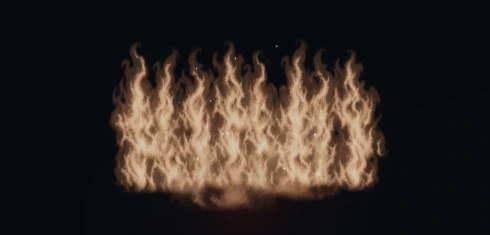
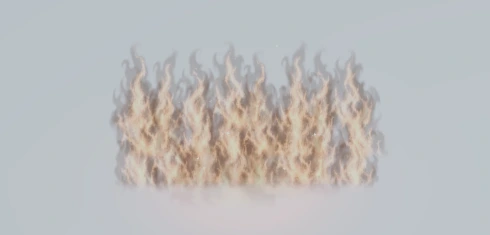
These are matched Unity captures of Flame Wall on two controlled surfaces, not a before/after repair or five different environments. The silhouette remains the subject; glow is supporting detail. Your lighting, exposure, terrain texture and camera scale still affect the result.
This guide uses Arcane Foundry 1.0.1 appearance controls. Its verified baseline is Unity 6.3 LTS and newer (tested 6000.3.27f1 and 6000.6.7f1), URP 17.3+ (tested 17.3.0 and 17.6.0) and Windows x64 / Direct3D 12. Isometric Lighting is not required.
Tune shape before glow.
| Control | What to adjust |
|---|---|
readabilityEnabled | Enable the optional readability treatment for the spell body. |
coreOpacity · 0–1 | Increase the visible colored body if the shape disappears into pale ground. |
edgeStrength · 0–1 | Introduce restrained tinted boundary contrast. Check that it does not become a heavy graphic outline. |
glowIntensity · 0–2 | Balance emission after the body reads. More glow is not always more legible. |
sigilOpacity, sigilBrightness · 0–1 | Control the ground sigil independently so it does not compete with the spell. |
These are authored settings. The runtime does not automatically sample the ground or select a contrasting palette. This treatment does not turn every sparkle into an outlined object, nor make the effect physically volumetric.
Edit a complete preset.
Export the selected definition's JSON first. Keep its effect ID, timing, colors, scale and other required fields. Then change the readability fields. This block is only an excerpt from a schema-3 preset; it is not a complete import file or a universally recommended look.
{
  "schemaVersion": 3,
  "effectId": "fire.flame_wall",
  "readabilityEnabled": true,
  "coreOpacity": 0.6,
  "edgeStrength": 0.55,
  "glowIntensity": 1.0,
  "sigilDetail": "Light",
  "sigilOpacity": 0.3,
  "sigilBrightness": 0.35
}
For temporary variations, use SpellPresetJson.TryCreateRuntime(json, catalog, out definition, out error). The catalog resolves a local effect ID; JSON does not load arbitrary asset paths. Use the runtime definition for playback, and destroy it only after every active effect using it has finished.
TryApply modifies its destination definition. Use a runtime copy when you do not intend a lasting asset change. Rejected imports leave the destination unchanged. See the integration notes for the surrounding workflow.
Test at gameplay scale.
- Hold the scene constant. Use the same spell, pose, seed, camera scale and exposure. Change one surface or one appearance setting at a time.
- Use the supplied bright-surface lab. Compare dark stone, grass, sand, snow and white marble. These controlled surfaces isolate contrast; they do not certify every outdoor lighting setup.
- Compare bloom on and off. If the main shape depends on bloom to exist, revisit core opacity and boundary contrast. Keep your game's exposure stable while comparing.
- Zoom out and overlap casts. Check target-area clarity, characters and animation timing at ordinary play distance. Start with the actual number of simultaneous abilities your encounters allow.
- Profile the built player. Compare readability enabled/disabled and different glow settings with the same effect count and camera. Transparent coverage, fragment work, overdraw and bloom can cost GPU time even when draw-call counts match.
No universal performance cost or frame rate is promised here. Pooling and detail settings are useful controls, but they do not remove the cost of drawing active spells.
Contrast cannot fix every intersection.
A visible card edge or a spell clipping through a wall is a different problem from low contrast. Arcane Foundry uses camera-facing textured layers with physical geometry where appropriate. Its ground feather assumes a locally horizontal target plane; it does not conform to slopes or soften every contact with scene geometry.
Place effects deliberately, check the intended isometric camera angles and review bounds near steps, raised platforms and actors. For motion in a full scene, watch the spell demonstration. For capture timing and instanced pieces, read offscreen recording notes.